The 7 best photo cleaner apps for iPhone (2026), compared honestly
Updated 23 September 2026 · 7 min read · Listings, ratings and reviews taken from the US App Store on 23 Sept 2026
There is no single best app, there is one per need. To do everything at once (photos, emails, contacts, video compression): Cleanup or Cleaner Kit. To sort while reliving memories: Swipewipe. To file into albums with a swipe: Slidebox. For AI analysis that picks the best shots: CleanMyPhone. For a simple, private swipe with a free daily quota: Picnic. And to get a precise number of gigabytes back, with duplicates verified byte for byte, a free plan that really deletes and the option to pay once: Giga, our app, ranked here where it belongs.
A goal in GB, seven sorting modes, nothing uploaded, nothing deleted without your confirmation. Free up to 3 GB a week.
How this comparison was made
We make Giga: read this page knowing that. To stay honest, we describe each app only from its own App Store listing and its public reviews, taken on 23 September 2026, and we quote no competitor prices, because they change too often. The ratings below are those of the US App Store on that date.
| App | Developer | Rating (count) | Min iOS | Strong point |
|---|---|---|---|---|
| Cleanup | Deep Flow | 4.7 (722,000) | 15 | All-in-one, the most installed |
| Cleaner Kit | BP Mobile | 4.4 (350,000) | 15 | All-in-one, on-device analysis |
| Swipewipe | MWM | 4.7 (94,000) | 18 | Swipe and memories |
| Slidebox | Slidebox LLC | 4.8 (16,500) | 15 | Swipe and albums |
| CleanMyPhone | MacPaw | 4.6 (22,800) | 17 | AI and video compression |
| Picnic | MWM | 4.8 (9,700) | 17 | Simple swipe, private, ad-free |
| Giga | Maxime Gadras | released Sept 2026 | 16.4 | Goal in GB, exact duplicates, pay once |
1. Cleanup: the most installed all-in-one
According to its listing, Cleanup swipes (left to delete, right to keep), groups similar photos while marking the one it judges "Best", deletes duplicates and screenshots, compresses videos, cleans promotional emails and merges contacts. An internal trash asks for a final confirmation.
For whom: people who want one app for photos, inbox and contacts. Check: the automatic "Best" pick is a judgement the app makes on your behalf; look at every group before validating. Email cleaning means granting access to your inbox.
2. Cleaner Kit: the all-in-one that analyses on the iPhone
Its listing advertises AI detection of duplicates, blurry shots and screenshots, swipe sorting that groups photos by period and sends what you discard to an archive to empty later, an email cleaner by sender, and contact management. The developer states that all AI processing happens on the iPhone.
For whom: the same audience as Cleanup, with the on-device promise. Check: recent one-star reviews are about the free trial converting to an annual subscription; read the end date and the price before touching the button.
3. Swipewipe: the swipe that brings memories back
Swipewipe walks through the camera roll month by month and adds what the others lack: On This Day with a widget and daily streaks, a memory map, AI enhancement of old photos, bookmarks to decide later, space-saved statistics. It requires iOS 18.
For whom: people for whom sorting should be pleasant, who enjoy revisiting their photos. Check: the full feature set is behind a subscription; an iPhone on iOS 16 or 17 cannot install it. Detailed comparison on our Swipewipe page.
4. Slidebox: the swipe for organising
The oldest of the genre. One gesture to delete, one tap to file into an album, similar photos compared by sliding from one to the next, favourites, undo. It works directly inside the Photos app, so iCloud follows.
For whom: people who want to organise as much as delete. Check: no automatic duplicate detection and no gigabyte measurement according to the listing; comparison is manual. Very well rated in the US.
5. CleanMyPhone: MacPaw's AI
The successor to Gemini Photos. The listing advertises a full-library scan (blurry, screenshots, large videos, duplicates), help choosing the best image among similar ones, video compression and contact merging. Requires iOS 17.
For whom: people who want an AI to propose, with video compression on top. Check: one-star reviews from former Gemini subscribers say the new version lost the fine comparison and the sub-category sorting; judge the current app, not the reputation of the old one.
6. Picnic: the simple, private swipe with a free quota
Also by MWM. "Like Tinder, but for your photos": left to archive, right to keep, then empty the archive in one go. Favourites synced with Photos, no ads, and the listing is explicit on two rare points: photos never leave the iPhone, and the free tier gives 100 swipes a day.
For whom: people who want the gesture, nothing else, and a clearly bounded free tier. Check: no duplicates, no categories, no gigabyte measurement according to the listing.
7. Giga: a goal in gigabytes, and nothing that decides for you
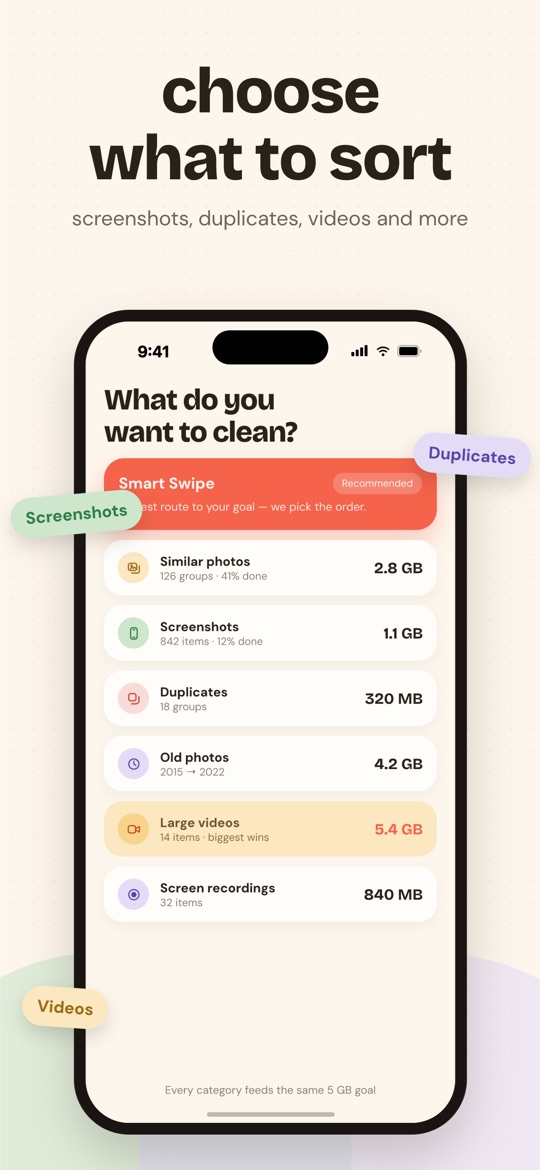
This is our app, released on 1 September 2026, so without a review history comparable to the other six. What it does, and what you can verify by installing it:
- It measures first. The analysis, on the iPhone and without downloading originals from iCloud, reads the real size of every file and splits it into seven modes: Smart Swipe, duplicates, similar, screenshots, large videos, screen recordings, old photos.
- You set a goal in gigabytes, and every swipe in any mode or month moves the same bar. Challenge reached, you delete, you start again.
- A duplicate is an exact copy (same instant, same size to the byte), the original is protected, and in a burst nobody ticks on your behalf.
- Nothing goes without a review of the whole selection then the iOS confirmation; a photo kept by mistake comes back with a tap.
- The free plan deletes: Smart Swipe and month browsing, 3 GB per rolling week. Premium at $6.99 a week, $24.99 a year (3-day trial) or $44.99 once.
- No photo uploaded, no ads, no tracking. iOS 16.4 and later, twelve languages.
What Giga does not do. No video compression, no emails, no contacts, no editing or memories, no albums, no Android, no Google Photos. If one of those is your primary need, one of the other six is a better choice.
Frequently asked questions
What is the best free photo cleaner app for iPhone?
None of the seven is entirely free: all are free to download with in-app purchases. What differs is what the free tier allows. Picnic advertises 100 free swipes a day; Giga lets you actually delete up to 3 GB a week, with Smart Swipe and month-by-month browsing. For the others, test the first useful action before paying.
Can these apps delete photos without my consent?
On iOS, every photo deletion goes through a system confirmation dialog, whatever the app. The risk is not silent deletion, it is selection: an app that ticks the "best" photo of a series for you, or calls a mere resemblance a "duplicate", makes you confirm in bulk choices you never made.
Are my photos uploaded to a server?
It depends on the app. Picnic, Cleaner Kit and Giga state that the analysis runs entirely on the iPhone. For the others, the answer is in the privacy policy: "cloud" analysis or AI restoration generally implies an upload.
Why isn't Giga ranked first everywhere?
Because it would not be true. Giga does not compress videos, does not sort contacts or emails, has no memories feature, and exists neither on Android nor for Google Photos. It is the best choice if you want a goal in gigabytes, duplicates verified byte for byte, a free plan that deletes and the option to pay once.
Free on the App Store · iOS 16.4 or later · no photo ever uploaded.