Delete duplicate photos on iPhone for free, without losing a single one
Updated 23 September 2026 · 5 min read
On iPhone, open Photos → Utilities → Duplicates: since iOS 16, the app spots exact copies and offers to merge them. It is free, and it is the first thing to try. Its limits: it does not see near-identical bursts, screenshots or heavy videos, it never tells you how many gigabytes you are getting back, and the album only appears once your iPhone has finished indexing the library. To go further, Giga confirms every duplicate by its exact file size, always keeps the original, lays similar photos side by side so you choose, and deletes nothing until you have reviewed the selection.
Giga finds duplicates, bursts, screenshots and large videos, and counts the gigabytes you get back. Free to start, everything happens on your iPhone.
Method 1: the Duplicates album in Photos
Apple added duplicate detection in iOS 16. It runs in the background, with nothing to install.
- Open Photos. On iOS 18 and later, scroll to Utilities in the Collections view; on iOS 16 and 17, it sits at the bottom of the Albums tab.
- Tap Duplicates. Each group shows the copies side by side, with their size.
- Tap Merge on a group, or Select → Select All → Merge to handle everything at once.
Merging keeps the highest-quality version, combines the metadata (date, location, caption), and sends the other copies to Recently Deleted.
Three things to know before concluding that "you have no duplicates":
- The album does not exist until the analysis has run. It happens while the iPhone is locked and charging, and can take several days on a large library.
- It only looks for exact or near-exact copies. The ten frames of a burst, the same screenshot received three times over messaging, videos sent and re-sent will not necessarily show up.
- It does not tell you what you gain. Neither how many gigabytes go, nor what is left to recover elsewhere.
Method 2: Giga, for everything Photos does not show
- Install Giga and allow access to your photo library. The analysis runs entirely on the iPhone, uploads nothing, and never downloads your originals from iCloud.
- Read the result. Giga separates exact duplicates, similar photos, screenshots, large videos, screen recordings and old photos, each with its weight in gigabytes.
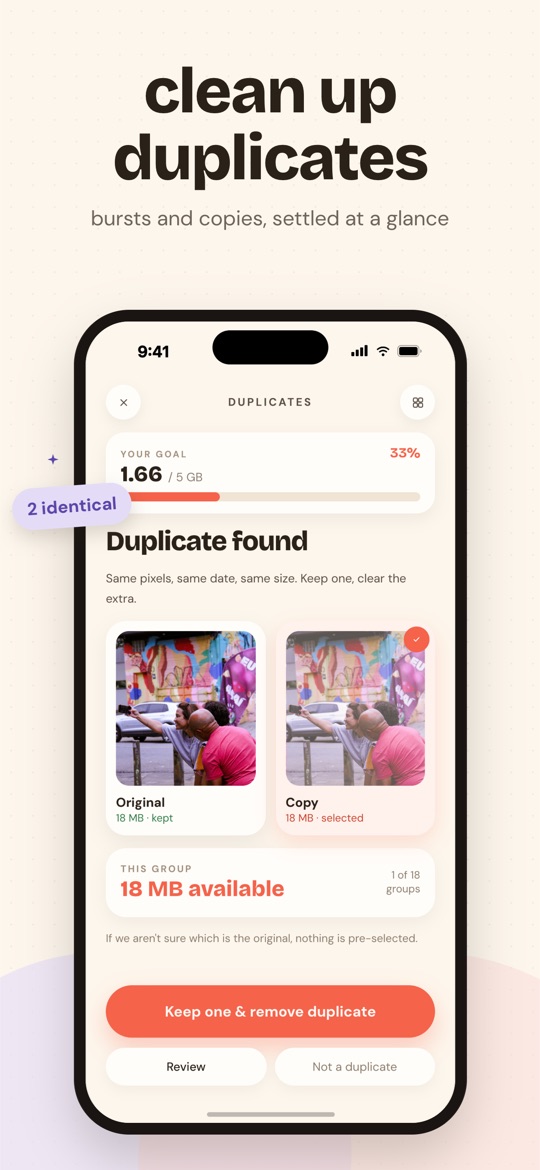
- Set a goal, 1 GB, 5 GB or everything that is piling up, then sort. In the Duplicates category, each group shows the protected original and the copies to tick. In the Similar category, the burst is laid out and you choose what stays.
- Review and confirm. Nothing leaves the library until you have reviewed the full selection, then confirmed a second time in the official iOS dialog.
What Giga calls a "duplicate" is checked twice: same capture instant to the millisecond, and same file size to the byte. A mere resemblance is never enough. That is stricter than most cleaning apps, and it is deliberate: a missed duplicate costs nothing, an invented one costs a photo.
Duplicate or similar: why the difference matters
The most frequent complaint in reviews of cleaning apps fits in one sentence: "it deleted similar pictures, not just duplicates". An edited image, a different framing, a smile on one and not the other: those are not copies, and nobody should lose them because an algorithm judged them "the same".
Giga never designates the "best" photo of a burst. The app cannot know which one you prefer, and Giga's own rules forbid deciding in silence. The whole group is shown, you tick what goes, and a "Compare" button puts two photos full screen, side by side, for the close calls.
What Giga does not do. It does not merge metadata the way Photos does: it deletes the copies, the original keeps its own. It does not read Google Photos and does not exist on Android. And the dedicated Duplicates category is part of Premium: the free plan goes through Smart Swipe, which draws from every category up to 3 GB deleted per week.
Frequently asked questions
Can Giga delete the original of a duplicate?
No. In a duplicate group, Giga marks the oldest copy (or the one you favourited) as the original and never offers it for deletion. Only the copies can be selected, and nothing is removed until you have reviewed the selection and confirmed in the iOS dialog.
What is the difference between a duplicate and a similar photo?
A duplicate is an exact copy: same capture instant and same file size, byte for byte. A similar photo is one frame of a burst or a series, close but different. Giga treats them separately: duplicates are confirmed by file size, similar photos are shown side by side and you tick what goes.
Is deleting duplicates free in Giga?
Smart Swipe, which is free, draws from every category including duplicates, up to 3 GB deleted per rolling week. The dedicated Duplicates category, which shows groups one by one with side-by-side comparison, is part of Premium.
Are deleted photos gone immediately?
No. iOS keeps everything you delete for 30 days in the Recently Deleted album of the Photos app. You can restore a photo from there, or empty the album to free the space right away.
Free on the App Store · iOS 16.4 or later · no photo ever uploaded.