How to sort thousands of photos on iPhone with a swipe, ten minutes a day
Updated 23 September 2026 · 5 min read
Yes, you can sort 20,000 photos by hand in the Photos app. What fails is not the method, it is the duration: a grid of thumbnails never forces a decision, and after ten minutes you close it. What lasts comes down to four rules. One photo at a time, one decision per photo, one second each. One month at a time, so you can see the end. A goal in gigabytes, so you know when to stop. And a safety net, so you can swipe without fear: undo, review, confirm, and 30 days of Recently Deleted. That is exactly the shape of Giga: left to delete, right to keep, and nothing goes without my confirmation.
Your library month by month, a goal in GB, one swipe per photo. Month browsing is free, with no swipe cap.
Why sorting by hand stops after ten minutes
The Photos app is built for finding and looking, not for deciding. Three things are missing when you want to clean up:
- No decision is asked of you. A grid of thirty thumbnails can be scrolled without deciding anything; you select a few obvious ones, skip the rest, and the rest is everything.
- No measurement. Photos tells you neither how much what you just deleted weighed, nor what is left. Without a number there is no end, so no reason to keep going.
- An invisible safety net. Recently Deleted exists, but inside Photos nothing reminds you of it at the moment you hesitate, so you keep everything, just in case.
That is why "Tinder for photos" became a genre: the swipe forces one decision per image, and the stack shows exactly what is left.
The method in four rules
- One photo, one decision, one second. No "maybe". If you hesitate more than two seconds, keep it: a kept photo can be sorted again, a photo you hesitated on was never sorted.
- One month at a time. Pick the month, finish it, move to the next. It is the only unit with a visible end, and a month of holidays empties in one session.
- A goal in gigabytes, not in photos. "Get 5 GB back" has an end; "tidy up" does not. And gigabytes are not spread evenly: three videos sometimes weigh as much as a thousand photos.
- A safety net you know. Knowing exactly how to go back is what lets you swipe fast. Without it, you look at every photo twice.
The same method, in Giga
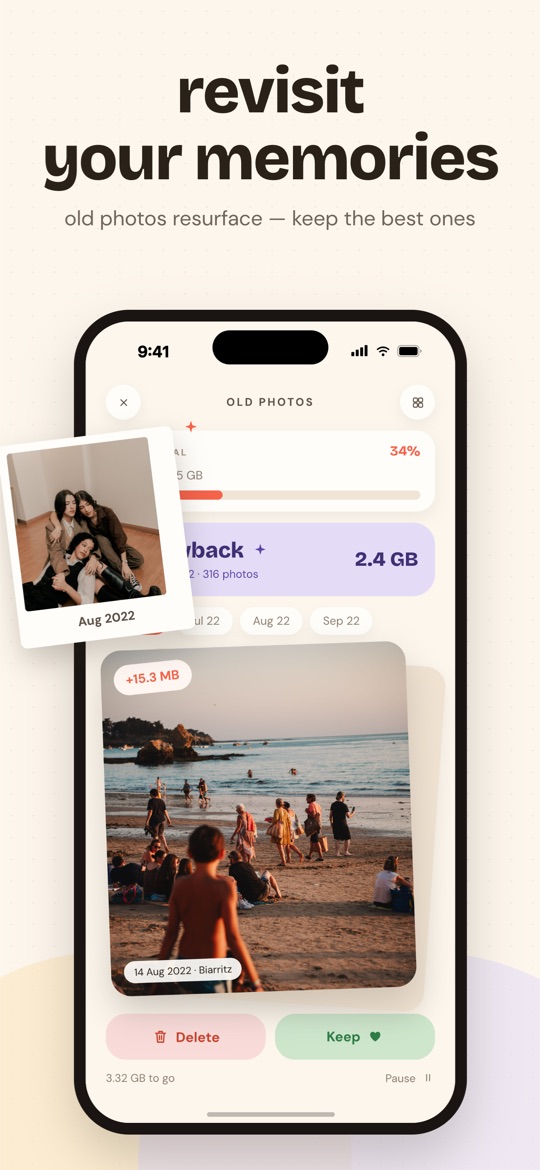
- The library, month by month. The home screen shows every month as a tile, by year, with a bar that fills as you decide. A tap opens the month as a stack of cards, newest first. No month is locked.
- The swipe. Left to delete, right to keep. A "+12.4 MB" flash tells you what the gesture was worth. Videos play, with sound, before you decide.
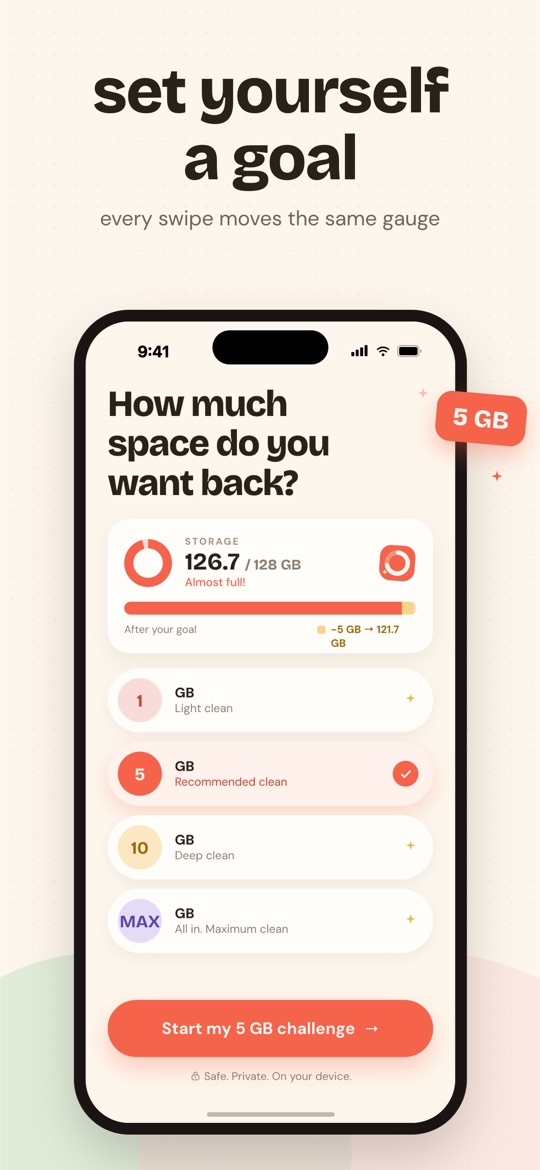
- The challenge. You pick a goal on a dial, 1 GB, 5 GB, 10 GB or everything recoverable. Every swipe, in any month or category, moves the same bar. Goal reached, you delete, then start another challenge.
- The safety net, in four layers. "Undo" shows your latest deletions as thumbnails so you pick back exactly the one you meant. A photo kept by mistake sits in "Kept items" and returns to the pile with a tap. Before any deletion, you review the whole selection. And iOS keeps everything for 30 days.
- The shortcut. Smart Swipe starts with what weighs and what is easy to decide: screenshots, duplicates, then one large video every fifteen cards. The first gigabytes come long before the last photo.
What Giga does not do. It does not sort for you: no photo is deleted or even ticked without your gesture. It does not file into albums and does not edit anything. The free plan covers month browsing and Smart Swipe, up to 3 GB deleted per week; the six dedicated categories are in Premium.
Frequently asked questions
How do I sort my photos month by month on iPhone?
In Photos, the Months view groups the library, but it only offers multi-selection. In Giga, the home screen shows every month of your library as a tile, with a bar that fills as you decide; a tap opens the month as a stack of cards, newest first. No month is locked, even on the free plan.
Does swiping left delete the photo right away?
No. A swipe prepares a selection. Nothing leaves the library until you have reviewed the full selection, then confirmed in the iOS dialog. And even then, photos stay 30 days in Recently Deleted.
How long does it take to sort 20,000 photos?
At one second per photo, about five and a half hours of decisions, which nobody makes in one sitting. At ten minutes a day, that is a month. Giga shortens the path by starting with what weighs (large videos, duplicates, screenshots): the first gigabytes come long before the last photo.
Is month-by-month browsing free in Giga?
Yes. The free plan includes month-by-month browsing and Smart Swipe, with 3 GB of deletion per rolling week. The six dedicated categories (duplicates, similar, screenshots, large videos, recordings, old photos) are part of Premium.
Free on the App Store · iOS 16.4 or later · no photo ever uploaded.